 Balázs Szücs
ab96eee5bc
* refactor(types): replace most usages of 'any' with 'unknown' and improve type safety across services and components

- Update method signatures, variables, and interfaces to use 'unknown' instead of 'any'
- Refine event and observable typings for better type inference
- Add or adjust explicit types for function parameters and return values
- Update Chart.js tooltip and context typings for chart services
- Improve type safety in Book, BookState, and related models
- Adjust template bindings and method calls to match stricter typings
- Add SecureSrcDirective for secure image loading with fallback and error handling

Signed-off-by: Balázs Szücs <bszucs1209@gmail.com>

* chore(angular): remove proxy configuration from development build settings

Signed-off-by: Balázs Szücs <bszucs1209@gmail.com>

* refactor(book-browser): streamline entity and book state management with reactive streams

- Refactor entity type and entity fetching logic to use observables and combine route params
- Simplify book state handling by consolidating filtering and fetching into a single reactive pipeline
- Remove redundant applySortOption logic and related subscriptions
- Fix book card index binding in template for improved rendering performance
- Ensure proper cleanup of epub rendition in epub-reader component

Signed-off-by: Balázs Szücs <bszucs1209@gmail.com>

* fix(book-browser, book-uploader): improve permission checks and enhance file upload handling

- Use optional chaining for user permission checks in book-browser.component.html to prevent runtime errors when user data is undefined
- Refactor book-uploader.component.ts to pass destination and IDs explicitly to uploadBatch, reconstruct files for strict type handling, and ensure proper upload flow and UI feedback

Signed-off-by: Balázs Szücs <bszucs1209@gmail.com>

* refactor(charts, services): improve type safety for book state validation and update form field checks

- Refactor isValidBookState methods across chart components and services to use type predicates and stricter type checks for BookState
- Update metadata-picker.component to simplify array field checks for authors, categories, moods, and tags
- Adjust magic-shelf-utils to remove unnecessary fallback in object spread
- Update notification-event.service to use correct timeout type for highlightTimeout

Signed-off-by: Balázs Szücs <bszucs1209@gmail.com>

* fix(theme): ensure safe merging of theme properties and improve type definition for themesMap

Signed-off-by: Balázs Szücs <bszucs1209@gmail.com>

* refactor(epub-reader): streamline book and rendition initialization logic

Signed-off-by: Balázs Szücs <bszucs1209@gmail.com>

---------

Signed-off-by: Balázs Szücs <bszucs1209@gmail.com>
📚 BookLore
Your Personal Library, Beautifully Organized
🌐 Official Website: https://booklore.org







BookLore is a powerful, self-hosted web application designed to organize and manage your personal book collection with elegance and ease. Build your dream library with an intuitive interface, robust metadata management, and seamless multi-user support.
✨ Features That Make BookLore Shine
📖 Library Management
|
🌐 Connectivity
|
👥 User Experience
|
🚀 Smart Features
|
💖 Support the Project
Your support helps BookLore grow and improve! 🌱
⭐ Star UsGive us a star to show your support and help others discover BookLore! |
💰 SponsorSupport development, hosting, and testing costs |
📢 Spread the WordShare BookLore with fellow book lovers and developers! |


🎯 Current Goal: Raising funds for a Kobo device to implement native Kobo sync support
💡 Support the Kobo Sync Bounty →
🎮 Live Demo: Explore BookLore in Action
Experience BookLore's features in a live environment before deploying your own instance!
| 🌐 Demo URL | 👤 Username | 🔑 Password |
|---|---|---|
| demo.booklore.org | booklore |
9HC20PGGfitvWaZ1 |
⚠️ Note: Demo account has standard user permissions only.
Admin features (user management, library setup) require a self-hosted instance.
🚀 Getting Started with BookLore
Choose Your Path
📘 DocumentationGuides for installation, setup, features, and more Contribute to the docs at: booklore-docs |
🐳 Quick DeployGet up and running in minutes with Docker Easiest way to self-host BookLore |


🐳 Deploy with Docker
Prerequisites
Ensure you have Docker and Docker Compose installed.
📦 Image Repositories
- 🐳 Docker Hub:
booklore/booklore - 📦 GitHub Container Registry:
ghcr.io/booklore-app/booklore
💡 Legacy images at
ghcr.io/adityachandelgit/booklore-appremain available but won't receive updates.
Step 1️⃣: Create Environment Configuration
Create a .env file in your project directory:
# 🎯 BookLore Application Settings
APP_USER_ID=0
APP_GROUP_ID=0
TZ=Etc/UTC
BOOKLORE_PORT=6060

# 🗄️ Database Connection (BookLore)
DATABASE_URL=jdbc:mariadb://mariadb:3306/booklore
DB_USER=booklore
DB_PASSWORD=ChangeMe_BookLoreApp_2025!

# 🔧 MariaDB Container Settings
DB_USER_ID=1000
DB_GROUP_ID=1000
MYSQL_ROOT_PASSWORD=ChangeMe_MariaDBRoot_2025!
MYSQL_DATABASE=booklore
Step 2️⃣: Create Docker Compose File
Create a docker-compose.yml file:
services:
  booklore:
    image: booklore/booklore:latest
    # Alternative: Use GitHub Container Registry
    # image: ghcr.io/booklore-app/booklore:latest
    container_name: booklore
    environment:
      - USER_ID=${APP_USER_ID}
      - GROUP_ID=${APP_GROUP_ID}
      - TZ=${TZ}
      - DATABASE_URL=${DATABASE_URL}
      - DATABASE_USERNAME=${DB_USER}
      - DATABASE_PASSWORD=${DB_PASSWORD}
      - BOOKLORE_PORT=${BOOKLORE_PORT}
    depends_on:
      mariadb:
        condition: service_healthy
    ports:
      - "${BOOKLORE_PORT}:${BOOKLORE_PORT}"
    volumes:
      - ./data:/app/data
      - ./books:/books
      - ./bookdrop:/bookdrop
    healthcheck:
      test: wget -q -O - http://localhost:${BOOKLORE_PORT}/api/v1/healthcheck
      interval: 60s
      retries: 5
      start_period: 60s
      timeout: 10s
    restart: unless-stopped

  mariadb:
    image: lscr.io/linuxserver/mariadb:11.4.5
    container_name: mariadb
    environment:
      - PUID=${DB_USER_ID}
      - PGID=${DB_GROUP_ID}
      - TZ=${TZ}
      - MYSQL_ROOT_PASSWORD=${MYSQL_ROOT_PASSWORD}
      - MYSQL_DATABASE=${MYSQL_DATABASE}
      - MYSQL_USER=${DB_USER}
      - MYSQL_PASSWORD=${DB_PASSWORD}
    volumes:
      - ./mariadb/config:/config
    restart: unless-stopped
    healthcheck:
      test: [ "CMD", "mariadb-admin", "ping", "-h", "localhost" ]
      interval: 5s
      timeout: 5s
      retries: 10
Step 3️⃣: Launch BookLore
docker compose up -d
Step 4️⃣: Access Your Library
Open your browser and navigate to:
🎉 Welcome to your personal library!
📥 BookDrop: Automatic Import
Drop Files, Import Automatically
BookLore's BookDrop feature automatically detects and processes book files dropped into a designated folder.
How It Works
graph LR
    A[📁 Drop Files] --> B[🔍 Auto-Detect]
    B --> C[📊 Extract Metadata]
    C --> D[✅ Review & Import]
- File Watcher: Monitors the BookDrop folder continuously
- Auto-Detection: Processes new files and extracts metadata
- Metadata Enrichment: Fetches details from Google Books, Open Library
- Review & Finalize: Review, edit, and import to your library
Docker Configuration
Add the BookDrop volume to your docker-compose.yml:
services:
  booklore:
    volumes:
      - ./data:/app/data
      - ./books:/books
      - ./bookdrop:/bookdrop  # 👈 BookDrop magic happens here
🤝 Community & Support
🐞 Bug ReportsFound an issue? |
💡 Feature ReqHave an idea? |
🤝 ContributeJoin development! |
💬 ChatJoin community! |




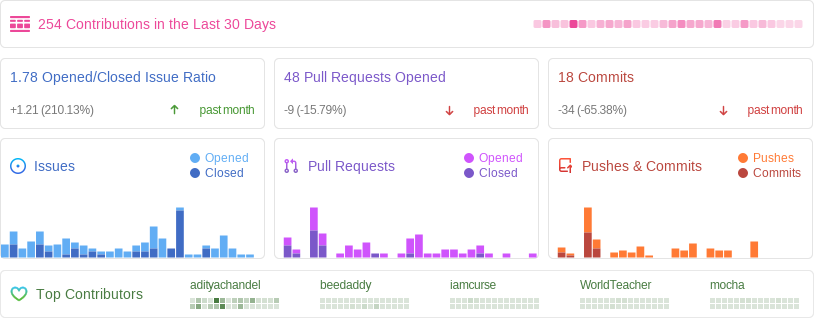
📊 Project Analytics
Repository Activity
⭐ Star History
👨💻 Contributors
Thanks to all our amazing contributors! 🙏
Want to see your face here? Start contributing today!
⚖️ License
GNU General Public License v3.0
Copyright © 2024-2025 BookLore

Made with ❤️ by the BookLore community