 926b87872e
* feat: Add custom font support for EPUB reader

This commit introduces the ability to manage and use custom fonts in the EPUB reader. Key changes include:

**Backend:**
- Added `CustomFontService` for handling custom font operations.
- Introduced `CustomFontController` for API endpoints.
- Created `CustomFontEntity` and `CustomFontRepository` for database interactions.
- Added `CustomFontMapper` and `CustomFontDto` for data transformation.
- Updated `SecurityConfig` to include JWT filter for custom fonts.
- Enhanced `GlobalExceptionHandler` to handle custom font-related exceptions.
- Added database migrations:
  - `V83__Create_Custom_Font_Table.sql` for creating the custom font table.
  - `V84__Add_Custom_Font_To_Epub_Preferences.sql` for integrating custom fonts with EPUB preferences.

**Frontend:**
- Added `CustomFontsComponent` and `FontUploadDialogComponent` for managing custom fonts in the settings UI.
- Updated `EpubReaderPreferencesComponent` to include custom font options.
- Introduced `CustomFontService` and `CustomFontModel` for frontend logic and data handling.
- Enhanced `SettingsComponent` to integrate custom font management.

**Other Changes:**
- Updated `EpubViewerPreferences` and `EpubViewerPreferencesEntity` to support custom fonts.
- Modified existing components and services to accommodate the new feature.

This feature enhances the user experience by allowing personalized font choices for EPUB reading.

* fix: custom font does not apply after page layout changed

* fix: duplicate API call when change EPUB global settings

* fix: some code review items, extract shared filter logic and improve UX

- Extract AbstractQueryParameterJwtFilter base class to reduce code duplication
  between CoverJwtFilter and CustomFontJwtFilter
- Remove cssIdentifier and fontUrl fields from CustomFont model (no longer needed)
- Add font name sanitization to prevent XSS and ensure data integrity
- Improve error handling in CustomFontService with proper APIException usage
- Replace RuntimeException handler with specific IllegalStateException and
  UnsupportedOperationException handlers in GlobalExceptionHandler
- Add skeleton loading states for font previews and font dropdowns
- Improve font loading state management in epub-reader component
- Create shared custom-font.util.ts for dropdown population logic
- Use reactive font$ subscription for real-time font updates in preferences
- Make DB migrations idempotent with IF NOT EXISTS clauses
- Optimize font file validation to read only header bytes instead of entire file

* chore: re-version migration scripts

* Fix: Kobo sync missing book covers (v1.16.4) (#2147)

Co-authored-by: acx10 <acx10@users.noreply.github.com>

* Fix: correctly update book cover hash on metadata refresh (#2149)

Co-authored-by: acx10 <acx10@users.noreply.github.com>

* Introduce Vitest as the frontend Angular testing framework for Booklore (#2150)

Co-authored-by: acx10 <acx10@users.noreply.github.com>

* Add Vitest frontend tests to CI with JUnit reporting and coverage (#2151)

Co-authored-by: acx10 <acx10@users.noreply.github.com>

* Update PR template to capture frontend test details

* Add instructions for running Angular frontend tests

---------

Co-authored-by: ACX <8075870+acx10@users.noreply.github.com>
Co-authored-by: acx10 <acx10@users.noreply.github.com>
📚 BookLore
Your Personal Library, Beautifully Organized
🌐 Official Website: https://booklore.org







BookLore is a powerful, self-hosted web application designed to organize and manage your personal book collection with elegance and ease. Build your dream library with an intuitive interface, robust metadata management, and seamless multi-user support.
✨ Features That Make BookLore Shine
📖 Library Management
|
🌐 Connectivity
|
👥 User Experience
|
🚀 Smart Features
|
💖 Support the Project
Your support helps BookLore grow and improve! 🌱
⭐ Star UsGive us a star to show your support and help others discover BookLore! |
💰 SponsorSupport development, hosting, and testing costs |
📢 Spread the WordShare BookLore with fellow book lovers and developers! |


🎯 Current Goal: Raising funds for a Kobo device to implement native Kobo sync support
💡 Support the Kobo Sync Bounty →
🎮 Live Demo: Explore BookLore in Action
Experience BookLore's features in a live environment before deploying your own instance!
| 🌐 Demo URL | 👤 Username | 🔑 Password |
|---|---|---|
| demo.booklore.org | booklore |
9HC20PGGfitvWaZ1 |
⚠️ Note: Demo account has standard user permissions only.
Admin features (user management, library setup) require a self-hosted instance.
🚀 Getting Started with BookLore
Choose Your Path
📘 DocumentationGuides for installation, setup, features, and more Contribute to the docs at: booklore-docs |
🐳 Quick DeployGet up and running in minutes with Docker Easiest way to self-host BookLore |


🐳 Deploy with Docker
Prerequisites
Ensure you have Docker and Docker Compose installed.
📦 Image Repositories
- 🐳 Docker Hub:
booklore/booklore - 📦 GitHub Container Registry:
ghcr.io/booklore-app/booklore
💡 Legacy images at
ghcr.io/adityachandelgit/booklore-appremain available but won't receive updates.
Step 1️⃣: Create Environment Configuration
Create a .env file in your project directory:
# 🎯 BookLore Application Settings
APP_USER_ID=0
APP_GROUP_ID=0
TZ=Etc/UTC
BOOKLORE_PORT=6060

# 🗄️ Database Connection (BookLore)
DATABASE_URL=jdbc:mariadb://mariadb:3306/booklore
DB_USER=booklore
DB_PASSWORD=ChangeMe_BookLoreApp_2025!

# 🔧 MariaDB Container Settings
DB_USER_ID=1000
DB_GROUP_ID=1000
MYSQL_ROOT_PASSWORD=ChangeMe_MariaDBRoot_2025!
MYSQL_DATABASE=booklore
Step 2️⃣: Create Docker Compose File
Create a docker-compose.yml file:
services:
  booklore:
    image: booklore/booklore:latest
    # Alternative: Use GitHub Container Registry
    # image: ghcr.io/booklore-app/booklore:latest
    container_name: booklore
    environment:
      - USER_ID=${APP_USER_ID}
      - GROUP_ID=${APP_GROUP_ID}
      - TZ=${TZ}
      - DATABASE_URL=${DATABASE_URL}
      - DATABASE_USERNAME=${DB_USER}
      - DATABASE_PASSWORD=${DB_PASSWORD}
      - BOOKLORE_PORT=${BOOKLORE_PORT}
    depends_on:
      mariadb:
        condition: service_healthy
    ports:
      - "${BOOKLORE_PORT}:${BOOKLORE_PORT}"
    volumes:
      - ./data:/app/data
      - ./books:/books
      - ./bookdrop:/bookdrop
    healthcheck:
      test: wget -q -O - http://localhost:${BOOKLORE_PORT}/api/v1/healthcheck
      interval: 60s
      retries: 5
      start_period: 60s
      timeout: 10s
    restart: unless-stopped

  mariadb:
    image: lscr.io/linuxserver/mariadb:11.4.5
    container_name: mariadb
    environment:
      - PUID=${DB_USER_ID}
      - PGID=${DB_GROUP_ID}
      - TZ=${TZ}
      - MYSQL_ROOT_PASSWORD=${MYSQL_ROOT_PASSWORD}
      - MYSQL_DATABASE=${MYSQL_DATABASE}
      - MYSQL_USER=${DB_USER}
      - MYSQL_PASSWORD=${DB_PASSWORD}
    volumes:
      - ./mariadb/config:/config
    restart: unless-stopped
    healthcheck:
      test: [ "CMD", "mariadb-admin", "ping", "-h", "localhost" ]
      interval: 5s
      timeout: 5s
      retries: 10
Step 3️⃣: Launch BookLore
docker compose up -d
Step 4️⃣: Access Your Library
Open your browser and navigate to:
🎉 Welcome to your personal library!
📥 BookDrop: Automatic Import
Drop Files, Import Automatically
BookLore's BookDrop feature automatically detects and processes book files dropped into a designated folder.
How It Works
graph LR
    A[📁 Drop Files] --> B[🔍 Auto-Detect]
    B --> C[📊 Extract Metadata]
    C --> D[✅ Review & Import]
- File Watcher: Monitors the BookDrop folder continuously
- Auto-Detection: Processes new files and extracts metadata
- Metadata Enrichment: Fetches details from Google Books, Open Library
- Review & Finalize: Review, edit, and import to your library
Docker Configuration
Add the BookDrop volume to your docker-compose.yml:
services:
  booklore:
    volumes:
      - ./data:/app/data
      - ./books:/books
      - ./bookdrop:/bookdrop  # 👈 BookDrop magic happens here
🤝 Community & Support
🐞 Bug ReportsFound an issue? |
💡 Feature ReqHave an idea? |
🤝 ContributeJoin development! |
💬 ChatJoin community! |




📊 Project Analytics
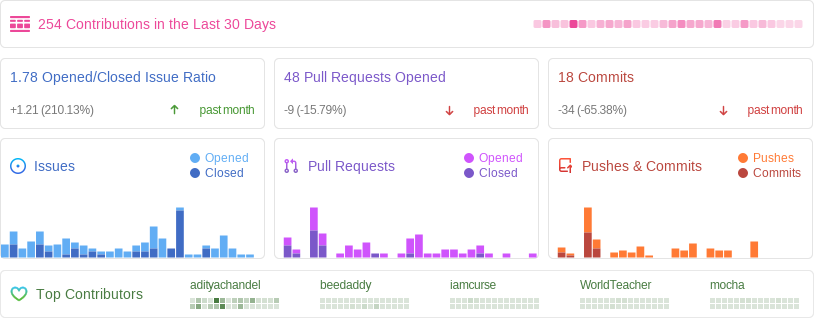
Repository Activity
⭐ Star History
👨💻 Contributors
Thanks to all our amazing contributors! 🙏
Want to see your face here? Start contributing today!
🌟 Sponsors
Thank you to our amazing sponsors!

Become a sponsor and get your logo here! Support us on Open Collective
⚖️ License
GNU General Public License v3.0
Copyright © 2024-2025 BookLore

Made with ❤️ by the BookLore community