 edddeduck
517f3a096d
Updated the documentation link to https://booklore-app.github.io/booklore-docs/docs/getting-started/ from the previous user
203 lines
11 KiB
Markdown
203 lines
11 KiB
Markdown
# BookLore
|
||

|
||

|
||

|
||

|
||
[](https://discord.gg/Ee5hd458Uz)
|
||
[](https://opencollective.com/booklore)
|
||
[](https://venmo.com/AdityaChandel)
|
||
|
||
BookLore is a self-hosted web app for organizing and managing your personal book collection. It provides an intuitive interface to browse, read, and track your progress across PDFs and eBooks. With robust metadata management, multi-user support, and a sleek, modern UI, BookLore makes it easy to build and explore your personal library.
|
||
|
||

|
||
|
||
## ✨ Key Features
|
||
|
||
- 📚 **Powerful Book Organization**: Keep your library organized with Libraries and Shelves. Sort by genre, author, or mood to find books easily.
|
||
- 🧠 **Intelligent Metadata Management**: Fetch rich metadata from Goodreads, Amazon, Google Books, Hardcover, and more, or fine-tune details with the advanced editor.
|
||
- 👥 **Multi-User Access with Permissions**: Add users, assign libraries, and control who can edit, upload, or download. Great for families, friends, or teams.
|
||
- 📖 **Built-in PDF, ePub, and CBX Reader**: Enjoy a smooth, distraction-free reading experience in your browser, with theme and setting options.
|
||
- 🌐 **OPDS 1.2 Integration**: Connect BookLore to favorite reading apps with full OPDS support for seamless downloads.
|
||
- 🔐 **Flexible Authentication**: Secure your library with optional OIDC login (Authentik, Pocket ID) or local JWT, your choice.
|
||
- 📤 **Smart Batch Upload with BookDrop Folder**: Drop dozens of books into the BookDrop folder; BookLore scans, organizes, and fetches metadata automatically.
|
||
- 📧 **Send Books by Email**: Easily share books by sending them directly via email from within BookLore—one click delivery.
|
||
- 📱 **Mobile-Optimized UI**: Responsive design for phones and tablets lets you manage your library anywhere.
|
||
- 🔄 **Open Source & Self-Hosted**: Full control of your digital library with open-source, self-hosted BookLore.
|
||
- 🚀 **Active Development**: Continuous improvements with regular updates to features, UI, and performance.
|
||
|
||
## 💖 Support the Project
|
||
|
||
If you find **BookLore** helpful, please consider supporting its development:
|
||
|
||
- ⭐ Star this repository to show your appreciation and help others discover it.
|
||
- 💸 Contribute via [Open Collective](https://opencollective.com/booklore) to help fund development, hosting, and testing costs.
|
||
> 📌 Currently raising funds for a **Kobo device** to implement and test native Kobo sync support.
|
||
> 💡 [Support the Kobo Sync Bounty →](https://opencollective.com/booklore/projects/kobo-device-for-testing)
|
||
- ⚡ Prefer one-time support? You can also donate via [Venmo](https://venmo.com/AdityaChandel).
|
||
|
||
## 🌐 Live Demo: Experience BookLore in Action
|
||
|
||
Explore the full capabilities of BookLore firsthand at [booklore-demo.adityachandel.top](https://booklore-demo.adityachandel.top).
|
||
|
||
**Access Credentials:**
|
||
- **Username:** `booklore`
|
||
- **Password:** `9HC20PGGfitvWaZ1`
|
||
|
||
Log in, explore the features, and discover how BookLore can transform personal library management.
|
||
|
||
## 🚀 Getting Started with BookLore
|
||
|
||
|
||
Kick off your BookLore journey with our official documentation and helpful video guides.
|
||
|
||
📘 [BookLore Documentation: Getting Started](https://booklore-app.github.io/booklore-docs/docs/getting-started/)
|
||
Our up-to-date docs walk you through installation, setup, configuration, and key features, everything you need to get up and running smoothly.
|
||
|
||
🎥 [BookLore Tutorials: YouTube](https://www.youtube.com/watch?v=UMrn_fIeFRo&list=PLi0fq0zaM7lqY7dX0R66jQtKW64z4_Tdz)
|
||
These older videos provide useful walkthroughs and visual guidance, but note that some content may be outdated compared to the current docs.
|
||
|
||
## 🐳 Deploy with Docker
|
||
|
||
You can quickly set up and run BookLore using Docker.
|
||
|
||
### 1️⃣ Install Docker & Docker Compose
|
||
|
||
Ensure you have [Docker](https://docs.docker.com/get-docker/) and [Docker Compose](https://docs.docker.com/compose/install/) installed.
|
||
|
||
### 2️⃣ Create docker-compose.yml
|
||
|
||
Create a `docker-compose.yml` file with content:
|
||
|
||
```yaml
|
||
services:
|
||
booklore:
|
||
image: ghcr.io/adityachandelgit/booklore-app:latest
|
||
container_name: booklore
|
||
environment:
|
||
- PUID=1000
|
||
- PGID=1000
|
||
- TZ=Etc/UTC
|
||
- DATABASE_URL=jdbc:mariadb://mariadb:3306/booklore # Only modify this if you're familiar with JDBC and your database setup
|
||
- DATABASE_USERNAME=booklore # Must match MYSQL_USER defined in the mariadb container
|
||
- DATABASE_PASSWORD=your_secure_password # Use a strong password; must match MYSQL_PASSWORD defined in the mariadb container
|
||
- SWAGGER_ENABLED=false # Enable or disable Swagger UI (API docs). Set to 'true' to allow access; 'false' to block access (recommended for production).
|
||
depends_on:
|
||
mariadb:
|
||
condition: service_healthy
|
||
ports:
|
||
- "6060:6060"
|
||
volumes:
|
||
- /your/local/path/to/booklore/data:/app/data # Internal app data (settings, metadata, cache)
|
||
- /your/local/path/to/booklore/books1:/books1 # Book library folder — point to one of your collections
|
||
- /your/local/path/to/booklore/books2:/books2 # Another book library — you can mount multiple library folders this way
|
||
- /your/local/path/to/booklore/bookdrop:/bookdrop # Bookdrop folder — drop new files here for automatic import into libraries
|
||
restart: unless-stopped
|
||
|
||
mariadb:
|
||
image: lscr.io/linuxserver/mariadb:11.4.5
|
||
container_name: mariadb
|
||
environment:
|
||
- PUID=1000
|
||
- PGID=1000
|
||
- TZ=Etc/UTC
|
||
- MYSQL_ROOT_PASSWORD=super_secure_password # Use a strong password for the database's root user, should be different from MYSQL_PASSWORD
|
||
- MYSQL_DATABASE=booklore
|
||
- MYSQL_USER=booklore # Must match DATABASE_USERNAME defined in the booklore container
|
||
- MYSQL_PASSWORD=your_secure_password # Use a strong password; must match DATABASE_PASSWORD defined in the booklore container
|
||
volumes:
|
||
- /your/local/path/to/mariadb/config:/config
|
||
restart: unless-stopped
|
||
healthcheck:
|
||
test: ["CMD", "mariadb-admin", "ping", "-h", "localhost"]
|
||
interval: 5s
|
||
timeout: 5s
|
||
retries: 10
|
||
```
|
||
Note: You can find the latest BookLore image tag `BOOKLORE_IMAGE_TAG` (e.g. v.0.x.x) from the Releases section:
|
||
📦 [Latest Image Tag – GitHub Releases](https://github.com/adityachandelgit/BookLore/releases)
|
||
|
||
|
||
### 3️⃣ Start the Containers
|
||
|
||
Run the following command to start the services:
|
||
|
||
```ini
|
||
docker compose up -d
|
||
```
|
||
|
||
### 4️⃣ Access BookLore
|
||
|
||
Once the containers are up, access BookLore in your browser at:
|
||
|
||
```ini
|
||
http://localhost:6060
|
||
```
|
||
## 📥 Bookdrop Folder: Auto-Import Files (New)
|
||
|
||
BookLore now supports a **Bookdrop folder**, a special directory where you can drop your book files (`.pdf`, `.epub`, `.cbz`, etc.), and BookLore will automatically detect, process, and prepare them for import. This makes it easy to bulk add new books without manually uploading each one.
|
||
|
||
### 🔍 How It Works
|
||
|
||
1. **File Watcher:** A background process continuously monitors the Bookdrop folder.
|
||
2. **File Detection:** When new files are added, BookLore automatically reads them and extracts basic metadata (title, author, etc.) from filenames or embedded data.
|
||
3. **Optional Metadata Fetching:** If enabled, BookLore can query metadata sources like Google Books or Open Library to enrich the book information.
|
||
4. **Review & Finalize:** You can then review the detected books in the Bookdrop UI, edit metadata if needed, and assign each book to a library and folder structure before finalizing the import.
|
||
|
||
### ⚙️ Configuration (Docker Setup)
|
||
|
||
To enable the Bookdrop feature in Docker:
|
||
|
||
```yaml
|
||
services:
|
||
booklore:
|
||
...
|
||
volumes:
|
||
- /your/local/path/to/booklore/data:/app/data
|
||
- /your/local/path/to/booklore/books:/books
|
||
- /your/local/path/to/booklore/bookdrop:/bookdrop # 👈 Bookdrop directory
|
||
```
|
||
|
||
## 🔑 OIDC/OAuth2 Authentication (Authentik, Pocket ID, etc.)
|
||
|
||
|
||
BookLore supports optional OIDC/OAuth2 authentication for secure access. This feature allows you to integrate external authentication providers for a seamless login experience.
|
||
|
||
While the integration has been tested with **Authentik** and **Pocket ID**, it should work with other OIDC providers like **Authelia** as well. The setup allows you to use either JWT-based local authentication or external providers, giving users the flexibility to choose their preferred method.
|
||
|
||
For detailed instructions on setting up OIDC authentication:
|
||
|
||
- 📺 [YouTube video on configuring Authentik with BookLore](https://www.youtube.com/watch?v=r6Ufh9ldF9M)
|
||
- 📘 [Step-by-step setup guide for Pocket ID](docs/OIDC-Setup-With-PocketID.md)
|
||
|
||
## 🤝 Community & Support
|
||
|
||
- 🐞 Found a bug? [Open an issue](https://github.com/adityachandelgit/BookLore/issues)
|
||
- ✨ Want to contribute? [Check out CONTRIBUTING.md](https://github.com/adityachandelgit/BookLore/blob/master/CONTRIBUTING.md)
|
||
- 💬 Ask questions or share feedback: [Discussions](https://github.com/adityachandelgit/BookLore/discussions)
|
||
- 💬 **Join our Discord**: [Click here to chat with the community](https://discord.gg/Ee5hd458Uz)
|
||
|
||
## 👨💻 Contributors & Developers
|
||
|
||
Thanks to all the amazing people who contribute to Booklore.
|
||
|
||
[](https://github.com/adityachandelgit/BookLore/graphs/contributors)
|
||
|
||
## ⭐ Star History
|
||
|
||
[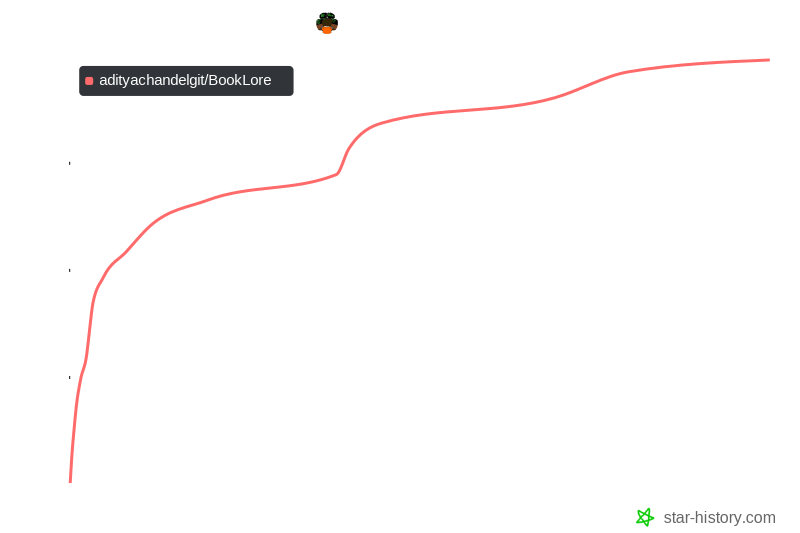](https://star-history.com/#adityachandelgit/BookLore&Date&theme=dark)
|
||
|
||
## 🧰 Tech Stack
|
||
|
||
<p align="left">
|
||
<img src="https://img.shields.io/badge/Spring%20Boot-6DB33F?style=for-the-badge&logo=springboot&logoColor=white" alt="Spring Boot" style="margin-right: 10px;"/>
|
||
<img src="https://img.shields.io/badge/Angular-DD0031?style=for-the-badge&logo=angular&logoColor=white" alt="Angular" style="margin-right: 10px;"/>
|
||
<img src="https://img.shields.io/badge/MariaDB-003545?style=for-the-badge&logo=mariadb&logoColor=white" alt="MariaDB" style="margin-right: 10px;"/>
|
||
<img src="https://img.shields.io/badge/Docker-2496ED?style=for-the-badge&logo=docker&logoColor=white" alt="Docker" style="margin-right: 10px;"/>
|
||
</p>
|
||
|
||
## ⚖️ License
|
||
|
||
* [GNU GPL v3](http://www.gnu.org/licenses/gpl.html)
|
||
* Copyright 2024-2025
|
||
|