# 📚 BookLore
### *Your Personal Library, Reimagined*
[](https://github.com/adityachandelgit/BookLore/releases)
[](LICENSE)
[](https://github.com/adityachandelgit/BookLore/stargazers)
[](https://hub.docker.com/r/booklore/booklore)
[](https://discord.gg/Ee5hd458Uz)
[](https://opencollective.com/booklore)
---
**A self-hosted, feature-rich platform for organizing and managing your digital book collection.**
*Built for book lovers, by book lovers.*
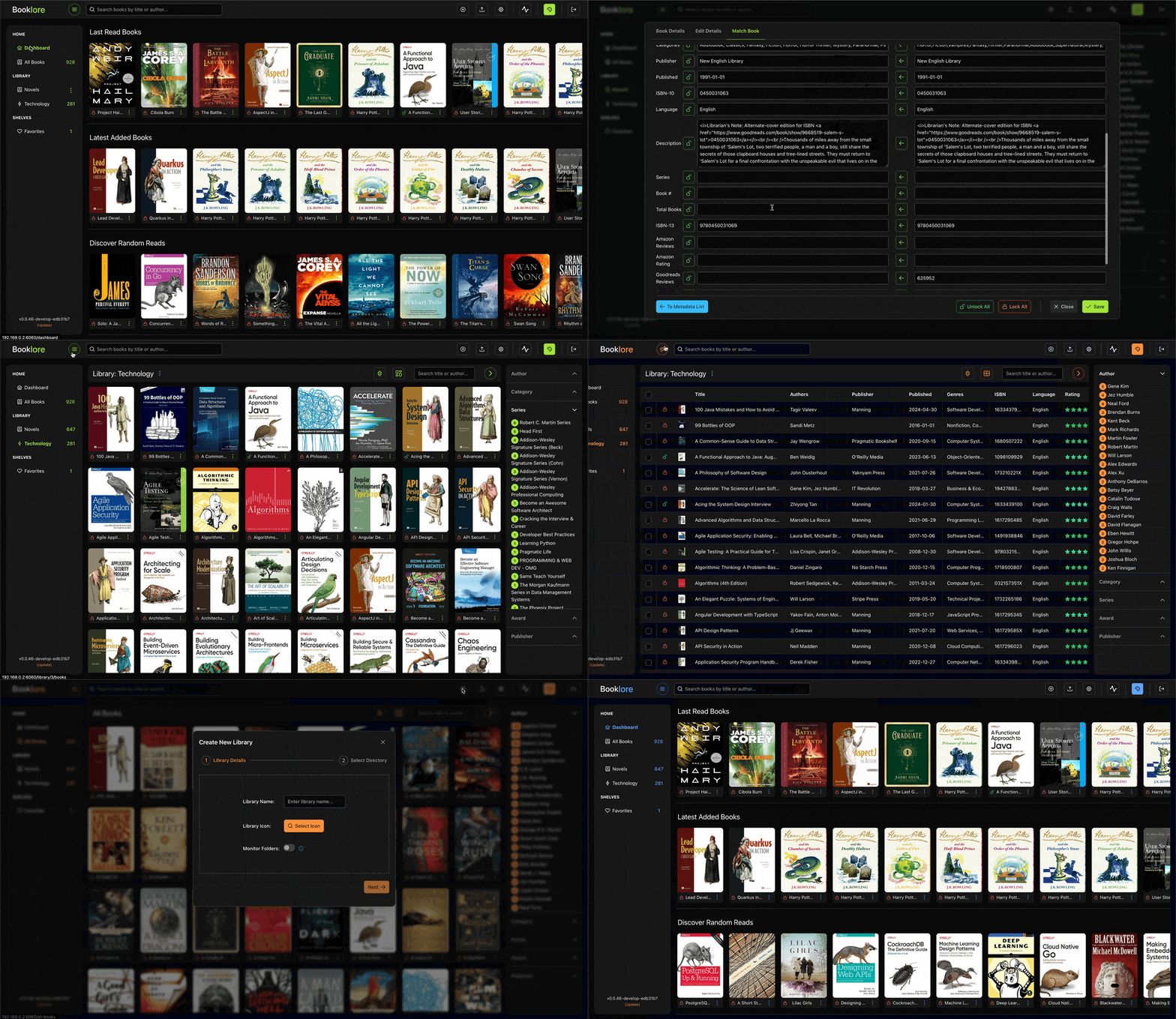
[**✨ Live Demo**](https://demo.booklore.dev) • [**📖 Documentation**](https://booklore-app.github.io/booklore-docs/) • [**🐛 Report Bug**](https://github.com/adityachandelgit/BookLore/issues) • [**💡 Request Feature**](https://github.com/adityachandelgit/BookLore/issues)
---
## 🌟 Why BookLore?
BookLore transforms the way you interact with your digital library. Whether you're a casual reader or a bibliophile with thousands of titles, BookLore provides the tools you need to organize, discover, and enjoy your collection.
### 📚 **Smart Library Management**
- Custom shelves with intelligent filtering
- Dynamic smart collections that auto-update
- Powerful search across your entire library
- Bulk operations for efficient management
### 🧠 **Intelligent Metadata**
- Auto-fetch from multiple sources
- Goodreads, Amazon, Google Books integration
- Community reviews and ratings
- Custom metadata editing
### 👥 **Multi-User Ready**
- Granular permission controls
- OIDC authentication support
- Private notes per user
- Shared library management
---
## ✨ Feature Highlights
📖 Reading Experience
- **Built-in Reader**: Enjoy PDFs, EPUBs, and comics with customizable themes
- **Progress Tracking**: Sync reading progress across devices
- **Personal Notes**: Save private annotations visible only to you
- **Mobile Optimized**: Fully responsive design for reading anywhere
🔧 Power Features
- **BookDrop Import**: Auto-detect and bulk import from a watched folder
- **Magic Shelves**: Create rule-based collections that update automatically
- **Format Conversion**: Automatic EPUB to KEPUB conversion
- **Metadata Enrichment**: Pull rich details from multiple online sources
🌐 Connectivity
- **OPDS Server**: Connect any compatible reading app wirelessly
- **Kobo Integration**: Seamless sync with Kobo e-readers
- **API Access**: Programmatic access to your library
- **Email Distribution**: One-click book sharing via email
---
## 💖 Support Development
Your support helps keep BookLore growing and improving!
[](https://opencollective.com/booklore)
[](https://github.com/adityachandelgit/BookLore)
**Current Fundraising Goal:** 🎯 Kobo Device for Testing
Help us implement and test native Kobo sync support by [contributing to our bounty →](https://opencollective.com/booklore/projects/kobo-device-for-testing)
---
## 🌐 Try the Live Demo
Experience BookLore before deploying your own instance:
> **📌 Note:** Demo has standard user permissions. Admin features require a self-hosted instance.
---
## 🚀 Quick Start
### Prerequisites
Ensure you have [Docker](https://docs.docker.com/get-docker/) and [Docker Compose](https://docs.docker.com/compose/install/) installed on your system.
### 📦 Available Images
| Registry | Image URL |
|----------|-----------|
| 🐳 Docker Hub | `booklore/booklore:latest` |
| 📦 GitHub | `ghcr.io/booklore-app/booklore:latest` |
> ⚠️ Legacy images at `ghcr.io/adityachandelgit/booklore-app` remain available but won't receive updates.
---
## 🐳 Docker Deployment
### Step 1: Create Environment Configuration
Create a `.env` file with your configuration:
```ini
# Application Settings
APP_USER_ID=0
APP_GROUP_ID=0
TZ=Etc/UTC
BOOKLORE_PORT=6060
# Database Connection
DATABASE_URL=jdbc:mariadb://mariadb:3306/booklore
DB_USER=booklore
DB_PASSWORD=ChangeMe_BookLoreApp_2025!
# MariaDB Configuration
DB_USER_ID=1000
DB_GROUP_ID=1000
MYSQL_ROOT_PASSWORD=ChangeMe_MariaDBRoot_2025!
MYSQL_DATABASE=booklore
```
### Step 2: Create Docker Compose File
Create `docker-compose.yml`:
```yaml
services:
booklore:
image: booklore/booklore:latest
container_name: booklore
environment:
- USER_ID=${APP_USER_ID}
- GROUP_ID=${APP_GROUP_ID}
- TZ=${TZ}
- DATABASE_URL=${DATABASE_URL}
- DATABASE_USERNAME=${DB_USER}
- DATABASE_PASSWORD=${DB_PASSWORD}
- BOOKLORE_PORT=${BOOKLORE_PORT}
depends_on:
mariadb:
condition: service_healthy
ports:
- "${BOOKLORE_PORT}:${BOOKLORE_PORT}"
volumes:
- ./data:/app/data
- ./books:/books
- ./bookdrop:/bookdrop
restart: unless-stopped
mariadb:
image: lscr.io/linuxserver/mariadb:11.4.5
container_name: mariadb
environment:
- PUID=${DB_USER_ID}
- PGID=${DB_GROUP_ID}
- TZ=${TZ}
- MYSQL_ROOT_PASSWORD=${MYSQL_ROOT_PASSWORD}
- MYSQL_DATABASE=${MYSQL_DATABASE}
- MYSQL_USER=${DB_USER}
- MYSQL_PASSWORD=${DB_PASSWORD}
volumes:
- ./mariadb/config:/config
restart: unless-stopped
healthcheck:
test: ["CMD", "mariadb-admin", "ping", "-h", "localhost"]
interval: 5s
timeout: 5s
retries: 10
```
### Step 3: Launch BookLore
```bash
docker compose up -d
```
### Step 4: Access Your Library
Open your browser and navigate to:
```
http://localhost:6060
```
---
## 📥 BookDrop: Automated Import
The **BookDrop** feature enables effortless bulk importing of books into your library.
### How It Works
```mermaid
graph LR
A[Drop Files] --> B[Auto-Detection]
B --> C[Metadata Extraction]
C --> D[Review & Edit]
D --> E[Import to Library]
```
1. **📁 Drop Files**: Place books in the BookDrop folder
2. **🔍 Detection**: Automatic file monitoring and recognition
3. **📊 Metadata**: Extract or fetch book information
4. **✏️ Review**: Edit metadata before final import
5. **✅ Import**: Add to your organized library
### Configuration
The BookDrop folder is automatically configured in the Docker setup:
```yaml
volumes:
- ./bookdrop:/bookdrop # 👈 Auto-import directory
```
Simply drop your `.pdf`, `.epub`, `.cbz`, or other supported files into this folder, and BookLore handles the rest!
---
## 📚 Documentation
For comprehensive guides, configuration options, and troubleshooting:
### **[📖 Visit Full Documentation →](https://booklore-app.github.io/booklore-docs/docs/getting-started/)**
*Installation • Configuration • Features • API • Troubleshooting*
💡 **Contribute to Docs**: Improve our documentation at [booklore-app/booklore-docs](https://github.com/booklore-app/booklore-docs)
---
## 🤝 Community & Contribution
We welcome contributions of all kinds! Whether it's:
- 🐛 Bug reports and fixes
- ✨ Feature requests and implementations
- 📖 Documentation improvements
- 🌍 Translations and localization
---
## 📊 Project Stats
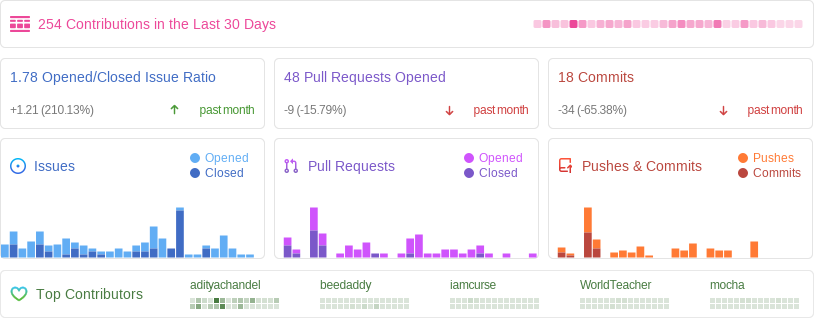
### Repository Activity
### ⭐ Star History
---
## 🙏 Contributors
Thank you to all our amazing contributors who help make BookLore better!